DeliverabilityCold email

Email deliverability consultant for outbound that lands in the inbox.

We find why your cold email lands in spam, fix the cause and protect your domain.

Example from our free diagnosis template

Example from our free diagnosis template. Before the repair: SPF passes only for the vendor's domain, DKIM has no signature, DMARC fails and the email from you@yourcompany.com lands in spam. After the repair: SPF, DKIM and DMARC pass, the domain is not on public blocklists, volume starts at 5 a day per mailbox and the email lands in the inbox.

400+B2B clients served since 2022
10,000+qualified opportunities opened
23%average close rate
$500M+pipeline generated for clients

Outbound we ran for revenue teams like these

DIAGNOSIS

What your numbers are telling you.

Most teams first see a deliverability problem as a symptom in their campaign numbers. Pick yours: what it usually means, where we look first and the evidence that settles it.

01Open rates fell
What it usually means
A weak signal on its own. Privacy features distort opens, and Google does not track them.
What we check first
Delivery errors, authentication results and spam rate, side by side.
Google, email sender guidelines
Low open rates aren't necessarily an accurate indicator of deliverability or spam classification issues.

Our ruleOpens never drive a decision

Want a first read on your own setup? Run the free domain check.

DEFINITION

What an email deliverability consultant actually does.

THE SHORT ANSWER

What does an email deliverability consultant do?

An email deliverability consultant diagnoses why messages land in spam or get rejected, then fixes the cause across authentication, sending infrastructure, list quality, volume and monitoring. Growth Cab does this for B2B outbound teams on Google Workspace and Microsoft 365. Every finding starts from evidence in message headers, bounce codes and provider data, and the setup stays with your team.

01
02
03
04
05
Five layers, repaired from the bottom up. The copy comes last.
  1. 05Monitoring

    A written rule for every signal that turns red

    Email deliverability
  2. 04Volume and pacing

    A slow ramp for every mailbox, raised only on healthy signals

  3. 03List quality

    Verified addresses, bounces and opt-outs suppressed at once

    Bounce rate
  4. 02Sending infrastructure

    Separate sending domains that still carry your brand

    Domain reputation
  5. 01Authentication

    SPF, DKIM and DMARC on the domain in your From line

    SPFDKIMDMARC
FREE TOOL

Check your domain the way every audit starts.

The same check we run on day one: MX, SPF, DKIM, DMARC, domain age, website and the Spamhaus blocklist. One score out of 100, free, public DNS only.

Example, checked Oct 15, 2026growthcab.comReady for cold email
  • MX records10/10
  • SPF record15/15
  • SPF ends with ~all or -all5/5
  • SPF DNS lookups (limit 10)5/5
  • DMARC record15/15
  • DMARC policy5/5
  • DMARC reports (rua)5/5
  • DKIM key20/20
  • Domain age10/10
  • Website or redirect5/5
Checks public DNS only. We do not store the domains you check.Open the full checker
PROCESS

Nothing changes until we know what is broken.

Then we fix it, test it on the real sending path and let volume back in one week at a time.

  1. 01Read-only audit

    Headers, bounce codes, Postmaster data and blocklists. No changes yet.

  2. 02Ranked findings

    Each finding with its evidence, an owner and the test that proves it fixed.

  3. 03Repairs

    DNS, DMARC and mailbox settings. Cold email moves off your main domain.

  4. 04Controlled restart

    Tests on the real sending path, then seed tests on Gmail and Microsoft 365.

  5. 05Ramp and monitor

    Volume rises week by week while the signals stay green.

Step 05 in numbers: the default rampMessages per mailbox, per working day
Test
Before launchControlled inboxes only
5
Week 1Every check passed
up to10
Week 2After a review of the signals
up to15
Week 3Earlier batches healthy
15
SteadyAbove 15 only after a test
Counts first emails and follow-ups across every campaign on the mailbox. The calendar alone never raises volume. Want the outreach run for you as well? See how we work.
OUR PROTOCOL

Rules written down before the first send.

Domains get damaged when volume keeps going through warning signs. Our protocol says what pauses a campaign, what must be green first and which advice we dropped.

The rules that pause a campaign

  1. A hard bounce on one contactSUPPRESSRemoved at once, never retried.
  2. Hard bounces reach 2% over 100+ attemptsPAUSE LISTNo new contacts until the cause is found.
  3. A spam complaint in a first test batchPAUSE BATCHContact suppressed, batch reviewed.
  4. Spam rate reaches 0.1% in Postmaster ToolsHOLD VOLUMEVolume stops rising. At 0.3%, that traffic stops.
  5. SPF, DKIM or DMARC fails on the real pathSTOP SENDEROff until the fix passes a new test.
  6. Temporary rejections (4xx) start to climbSLOW DOWNThe queue follows the provider's retry rules.
  7. A blocklist listing is confirmedPAUSEFix the cause, then delist officially.
  8. A monitoring check stops workingHOLDNo increase until it works again.
PROOF

We run it on our own domains first.

Our live DNS records, the reports that showed who was sending email as us, and the outbound we run for clients.

Official partner programs
  1. $dig +short TXT growthcab.com"v=spf1 include:_spf.google.com ~all"SPF1 of 10 lookups
  2. $dig +short TXT google._domainkey.growthcab.com"v=DKIM1; k=rsa; p=MIIBIjANBgkqhkiG9w0B…"DKIM2048-bit key
  3. $dig +short TXT _dmarc.growthcab.com"v=DMARC1; p=quarantine; sp=reject; rua=mailto:…"DMARCenforced, reports on
Who sends email as growthcab.comDMARC reports, Dec 2025 to Sep 2026
  • Our own mailGoogle Workspace and Resend, aligned.
  • Forwarded mailBroken on the way, saved by ARC.
  • ImpersonatorsUnsigned, from other networks. Quarantined.
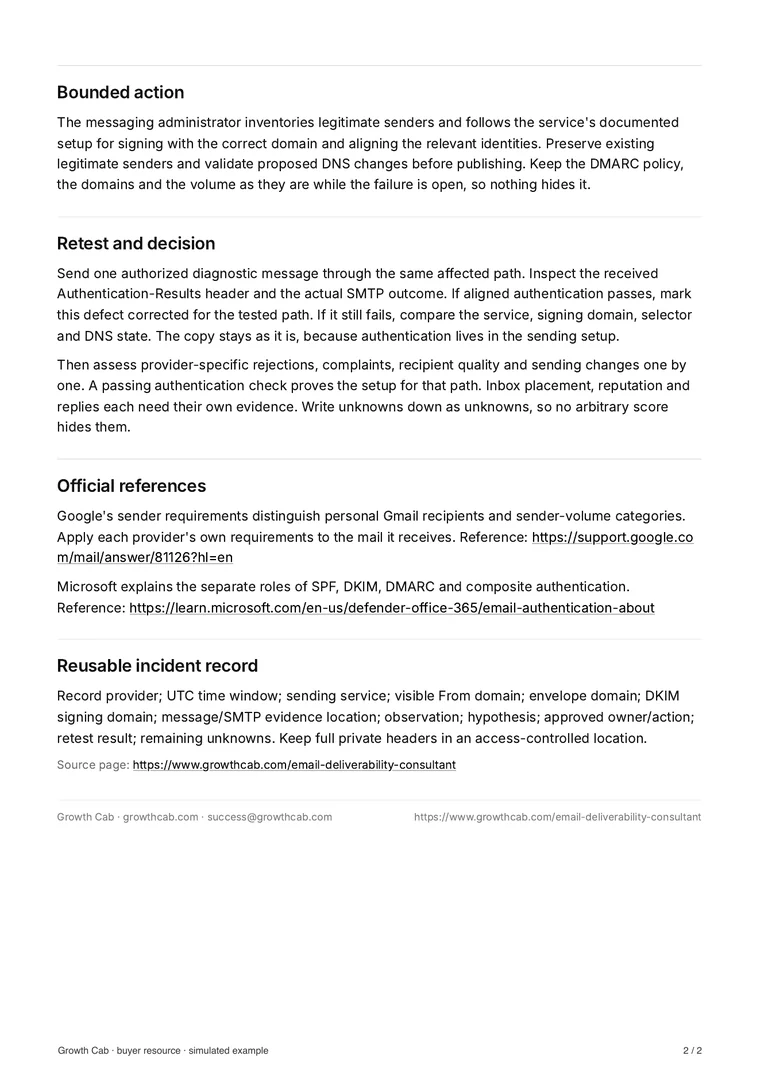
Page 2 of the Growth Cab deliverability diagnosis: action, retest and the incident template
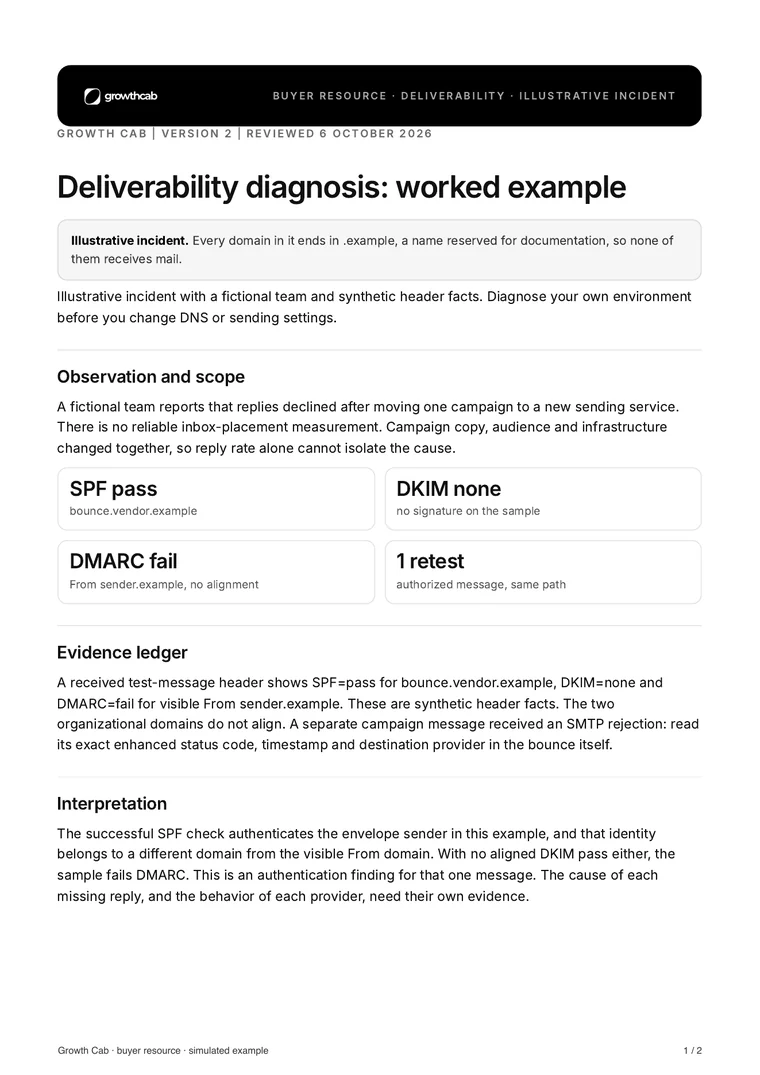
Page 1 of the Growth Cab deliverability diagnosis: observation, evidence ledger and interpretation
2 pages, selectable text
FREE TEMPLATE

Diagnose one failure the way we do.

A worked example of a common failure: SPF passes and DMARC still fails. Download the commented diagnosis and the incident template we use.

Synthetic headerIllustrative incident

Authentication-Results: mx.example.net;spf=pass smtp.mailfrom=bounce.vendor.example 1dkim=none 2dmarc=fail header.from=sender.example 3

  1. 1SPF passes for the sending service's bounce domain.
  2. 2No DKIM signature on the message.
  3. 3DMARC fails: neither result matches the From domain.
  1. Observe
  2. Evidence
  3. Interpret
  4. Act
  5. Retest

Illustrative example with synthetic header facts. Diagnose your own environment before changing DNS or sending settings. Official references: Google's email sender guidelines, Yahoo's sender best practices, Outlook.com's requirements for high-volume senders and Microsoft's email authentication documentation.

FAQ

Email deliverability FAQ.

Short answers to the questions B2B teams ask before they hire a deliverability consultant. The first call covers the rest.

Book a call

What does an email deliverability consultant do?

An email deliverability consultant finds out why email lands in spam or gets rejected, then fixes the cause. The work covers authentication (SPF, DKIM and DMARC), sending domains and mailboxes, list quality, volume and pacing, and monitoring. Growth Cab does it for B2B outbound teams on Google Workspace and Microsoft 365, starting from the evidence in message headers, bounce codes and provider data.

Is it a deliverability problem or a copy problem?

Falling open or reply rates alone cannot tell you. Check delivery errors, authentication results, domain reputation and spam complaints alongside controlled inbox tests. Google says it does not track open rates, and that low open rates aren't necessarily an accurate indicator of deliverability problems (source: Google, email sender guidelines). When all of those look healthy, review the list and the offer next.

Can you fix a domain that is already burned?

It depends on what burned it. We find the cause first, because the same cause will damage any new domain too. Then we fix it, request delisting through the official channel where there is a listing, and restart at low volume. If outreach ran from your main domain, we move it to a sending domain clearly linked to your company, so the main domain carries far less of that risk.

Do you work with Google Workspace, Microsoft 365 or both?

Both. They filter in different ways, so we test on each one, read each mailbox provider's responses separately and tune the setup for both.

Do you guarantee inbox placement?

No. No infrastructure can guarantee inbox placement, and a vendor who promises it is usually selling volume. Every finding we report comes with its evidence: what we checked, what we fixed and the tests that show it worked.

How long until we are back to steady volume?

After the repairs, plan on about three weeks of ramp: 5 messages per mailbox per working day in week one, up to 10 in week two and up to 15 in week three. Your steady daily volume is then the number of mailboxes times 15. Each step waits for green signals, so the calendar alone never raises volume. The audit comes first, and its length depends on how many domains and mailboxes you run.

Should we send cold email from our main domain?

We keep outreach off the domain your company runs on, so your sales, support and billing email depend less on how a campaign performs. Sending domains should still be clearly linked to your company, with real people behind every mailbox, because lookalike domains that hide who is writing create a risk of their own.

Do we need a warmup tool?

Not necessarily. Warmup tools create artificial engagement between mailboxes, and their settings come from the vendors that sell them. We treat warmup as optional and judge a mailbox by its real traffic: bounces, complaints and replies.

What do Google, Yahoo and Microsoft require from senders?

These rules cover mail sent to personal inboxes. Every sender to personal Gmail accounts needs SPF or DKIM and a spam rate below 0.3%. Bulk senders, around 5,000 messages a day to personal Gmail accounts, also need SPF, DKIM, a DMARC record and a From domain aligned with SPF or DKIM, plus one-click unsubscribe on marketing mail. Google recommends keeping spam rates under 0.1%. Yahoo has similar rules and asks senders to honor unsubscribes within two days, and Outlook.com requires SPF, DKIM and DMARC from senders above 5,000 messages a day. Business mailboxes on Google Workspace and Microsoft 365 filter with their own systems and admin settings, so we test them separately. Sources: Google, Yahoo and Microsoft sender guidelines.

Who is deliverability consulting for?

B2B teams sending cold email from Google Workspace or Microsoft 365: when replies or meetings fell and nobody can say why, before adding mailboxes, domains or volume, or when the main domain carries sales, support and invoices and outreach needs to stay away from it. It does not fit newsletters to opted-in lists, anyone who wants a guaranteed inbox rate, or hundreds of throwaway domains to outrun the filters. We work with B2B tech companies past product-market fit, selling contracts of $50,000 or more.

Book a callFit check

Get your outbound back in the inbox.

The first call is a fit check with the founders. Bring your sending setup and your numbers: we tell you what we would check first, and say so when it is not a fit.

Or write to success@growthcab.com

Federico Donatone and Lorenzo Asnaghi, Growth Cab founders, in New York
Federico Donatone and Lorenzo Asnaghi, Growth Cab founders, New York