
A catch-all email is an address on a domain whose mail server accepts messages for any name, including addresses that do not exist. That is why verifiers cannot confirm it: the server says yes to everything. So a catch-all result means unknown, and unknown is not valid. In cold email, I keep catch-all addresses out of the first send.
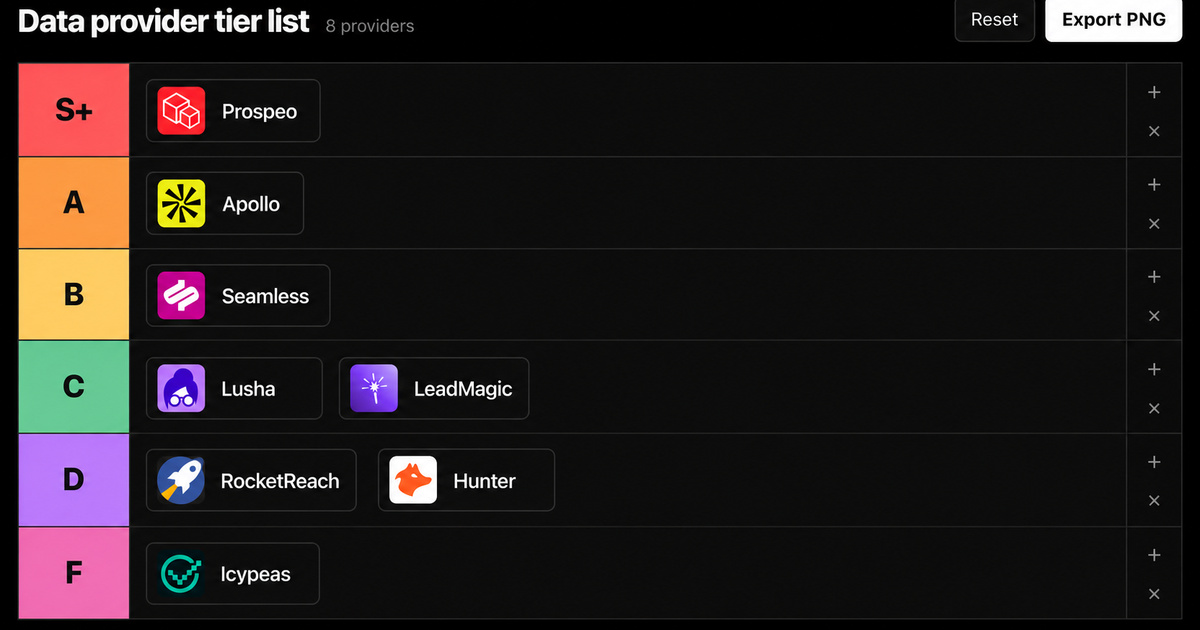
My rule comes from a benchmark on a related problem. We ran the same 600 leads through 8 data providers and checked every email with an outside verifier. Catch-all and guessed addresses counted as misses. Even inside the valid label, RocketReach shipped 63 of 440 addresses that BounceBan could not confirm. A valid label is a vendor claim. A catch-all label is not even that.
- Catch-all means two things: a mailbox setting that collects mail for unknown addresses, and a verification result that says the server accepts everything.
- A verifier checks a mailbox by asking the server to accept a recipient. A catch-all server accepts a made-up address too, so the check proves nothing.
- Some servers accept first and bounce later. RFC 5321, the standard behind email delivery, describes exactly that behavior.
- They are common: MailerCheck found that 8.6% of all emails it verified were catch-all, with a median of 15.25% per customer list (July 2025).
- For cold email, send first to addresses a second verifier confirms. Treat catch-alls as a separate, small and optional wave.
 in
in
“Most data provider benchmarks are bullshit. So we tested 600 leads on 8 tools and verified every email ourselves:”
What Is a Catch-All Email?
A catch-all email is a mailbox that receives every message sent to its domain, whatever comes before the @. Write to jonh@company.com instead of john@company.com and the message still lands somewhere. Nothing bounces back to the sender.
The term has two meanings, and most pages mix them. For the company that owns the domain, catch-all is a routing setting. For a sender checking a list, catch-all is a verification result: the domain accepts everything, so the specific person could not be confirmed. This guide is mostly about the second meaning, because that is the one that costs senders money.
| Meaning | Who uses the term | What it tells you |
|---|---|---|
| Mailbox setting | IT admins at the receiving company | Mail sent to unknown addresses on the domain goes to one inbox instead of bouncing |
| Verification result (also called accept-all or risky) | Senders, sales teams, verification tools | The server accepted a test address, so the person's mailbox cannot be proven real or dead |
Companies switch it on so no message gets lost: a typo in a customer email, the old address of someone who left, a request sent to an alias nobody created. Google Workspace and Proton have a catch-all setting, and Microsoft 365 can do the same with a workaround. The price is noise. A catch-all inbox also collects the spam sent to made-up names.
How Does a Catch-All Email Work?
A catch-all email works at the moment of delivery. The sending server names each recipient with a command called RCPT TO. A normal server checks its directory and answers 250, which means accepted, or 550, which means the mailbox is unavailable. A catch-all server answers 250 for every name on the domain, then routes the unknown ones to a chosen inbox.
Email verifiers use the same conversation without sending a message. They connect, name the recipient and read the reply. To spot a catch-all, they also ask about an address that cannot exist, like a string of random letters. If the server accepts that one too, every yes from that server is worthless.
There is a second trap. RFC 5321 notes that some servers only check recipients after they receive the message, then send a failure notice back. So a server can say yes during the check and bounce the real email later. From the outside, you cannot tell a true catch-all from a server that accepts first and bounces afterwards. Most guides skip this part. It is why I never trust a catch-all label on its own.
Not every accept-all result is a choice. Microsoft 365 rejects unknown recipients at the edge with the error 550 5.4.1, through Directory-Based Edge Blocking, when every mailbox of the domain lives in Exchange Online. Hybrid setups and security gateways placed in front of the mail server can accept every address too. A verifier sees a deliberate catch-all, a hybrid relay and a security gateway the same way: every address accepted.
| Result | What the server did | Send it in cold email? |
|---|---|---|
| Valid | Accepted the real address and rejected a made-up one | Yes, if a second verifier agrees |
| Invalid | Rejected the address with a 550-type error | Never |
| Catch-all (accept-all) | Accepted the real address and a made-up one | Not in the first send |
| Unknown | Did not answer, timed out or asked to retry later | Retry once, then treat it as catch-all |
| Role address (info@, sales@) | Usually accepted | Skip it for one-to-one outreach |
Bounces are only one part of inbox placement. My cold email deliverability guide covers the Gmail, Yahoo and Outlook rules that decide the rest.
What Does Catch-All Mean in Email Verification?
In email verification, catch-all means the verifier reached the mail server but could not confirm the mailbox, because the server accepts any address. Tools call it catch-all, accept-all or risky. Unknown is a different result: the server never gave a clear answer. None of these labels means valid. They mean the verifier ran out of evidence.
This matters when you buy data. A provider can show a high find rate by counting catch-all guesses as found emails. In our benchmark, an email counted only when the provider marked it valid and BounceBan, an outside verifier, confirmed it. We did not publish how many results came back catch-all. We simply refused to count them. That made the reach numbers smaller and usable in a real campaign.
The full results are public, provider by provider, in our test of 8 lead generation database companies on the same 600 leads.
How Common Are Catch-All Emails?
Catch-all emails are common enough to change your list math. MailerCheck, an email verification tool, reported in July 2025 that 8.6% of all emails it verified were catch-all. The median customer list held 15.25% catch-all addresses. Dropcontact, a French enrichment tool, says about 30% of B2B email servers are catch-all, without a published source.
Take a list of 1,000 contacts. At MailerCheck's median of 15.25%, about 150 would be addresses no verifier can prove. MailerCheck measures mostly marketing lists. Cold B2B lists are built on company domains, and company domains are where catch-alls live. So I treat that share as a floor. A 30% figure with no source is a guess. A 15% median from real lists is a starting point.
Should You Send to Catch-All Emails?
You should not send to catch-all emails in your first cold email send. Send first to addresses a provider marked valid and a second, independent verifier confirmed. That is our rule at Growth Cab. You lose some reach. You keep the domain. Dropcontact recommends sending to catch-alls anyway. On a new domain I disagree: one bad batch costs more than the replies it brings.
Catch-alls are not all bad addresses. Many belong to real people who read their mail. A true catch-all never bounces. The risk sits in the servers that look identical during the check and bounce the real email later, because the verifier gives both the same label. Google's sender guidelines set a spam rate ceiling of 0.3% and no bounce threshold, so there is no safe number to hide behind.
| Signal | Keep it for a later wave | Drop it |
|---|---|---|
| Where the address came from | Published by the person or company: website, signature, public document | Guessed from a name pattern |
| Person still at the company | Confirmed on LinkedIn or the company site this month | Left the company, or unclear |
| Second verifier | Resolved to deliverable by a tool that claims catch-all checks | Still catch-all or unknown |
| Account value | A target account you would call anyway | One contact among thousands |
| Other channel | No other way to reach the person | LinkedIn or phone is available |
If you do send to catch-alls, make it a second wave. The main list goes first and proves the mailboxes healthy. Then a small batch of the best catch-alls goes out. Use one strict rule: if an address bounces because the user does not exist (a 5.1.1 code), that domain is no true catch-all, so remove every other address on it. A 5.7.x policy block is a different problem and points at your sending setup.
How Do You Verify a Catch-All Email?
You cannot verify a catch-all with a normal mailbox check, because the server answers yes to everything. You can raise the odds with evidence from outside the mail server. This is the sequence I would run before any catch-all address enters a campaign.
- Run the list through your provider's verification, then through a second, independent verifier. Only addresses both call valid go into wave one.
- Move catch-all and unknown results into their own segment. Never mix them into the main sequence.
- Check where each catch-all address came from. Published beats pattern-matched. A guess on a catch-all domain is still a guess.
- Confirm the person still works there, on LinkedIn or the company site. Job changes turn good addresses into dead ones.
- Try a specialist verifier on a sample you already know. BounceBan, the verifier in our benchmark, claims it can resolve 85% to 95% of catch-all, greylisted and gateway-protected emails. Test the claim before you trust it.
- Send a small test batch and read the hard bounces before you send more.
- Reach everyone else through another channel. A LinkedIn message or a call puts no sending domain at risk.
Double verification does most of the work. Two verifiers that agree remove the addresses that look fine on one tool and fail on another. The other steps only decide what to do with the gray zone.
Building the list from scratch? My guide on how to build a B2B lead list shows where verification fits between sourcing and sending.
How Do You Set Up a Catch-All Email on Your Own Domain?
Google Workspace and Proton have a catch-all setting. Microsoft 365 needs a workaround. Before you switch one on, know the trade-offs. It collects the spam and address-guessing attacks aimed at random names on your domain. And senders can no longer verify your people, so careful senders, like us, may skip your addresses.
- Google Workspace: in the Admin console, open Apps, Google Workspace, Gmail, Routing. Add a rule for inbound messages that changes the envelope recipient to your catch-all address, applied to all inactive and unrecognized accounts. Google says changes can take up to 24 hours.
- Microsoft 365: there is no single switch. The usual workaround sets the domain to Internal relay under Mail flow, Accepted domains, then adds a mail flow rule with a redirect action for recipients who are not your real users.
- Proton Mail: any paid plan with a custom domain. Open Settings, All settings, Organization, Domain names, then Actions and Set catch-all.
Should You Remove Catch-All Emails From a Newsletter List?
Keep a catch-all address on a newsletter list if the person typed it into your signup form and confirmed it. Catch-all only means the server cannot be tested. A double opt-in proved the address received your email once. Security scanners can click confirmation links automatically, so prune addresses that never open or reply. The cold email rules above apply to addresses you found yourself.
Seeing bounces climb on your own campaigns even after verification? That is where our email deliverability work starts: list, infrastructure and sending rules, checked together.
Frequently asked questions
What is a catch-all email?
A catch-all email is a mailbox set up to receive every message sent to a domain, even to addresses that do not exist. In email verification, catch-all is also the result a tool returns when a server accepts any address. It means the person's mailbox could not be confirmed as real or dead.
Is a catch-all email valid?
Not as far as a verifier can tell. The server accepts every address, so the check says nothing about the specific person. Some catch-all addresses belong to real, active people. Others are dead and get collected or bounced later. Treat catch-all as unknown and keep it out of your main send.
Should I send cold emails to catch-all addresses?
Not in the first send. Send to addresses a second verifier confirms, then decide on catch-alls. Keep the ones with a published source, a person confirmed at the company and a high account value. Send them later in a small batch. When one address bounces as an unknown user, drop every other address on that domain.
How do I know if a domain is catch-all?
Run the address through an email verifier. Behind the scenes, the tool asks the domain's mail server to accept both the real address and a made-up one. If the server accepts the made-up address too, the domain is catch-all. You cannot see it from the address itself.
Sources
IETF, RFC 5321, Simple Mail Transfer Protocol: reply codes 250 and 550 (section 4.2), servers that verify recipients only after receiving the message (section 3.3), October 2008, checked September 28, 2026.
IETF, RFC 3463, Enhanced Mail System Status Codes: X.1.1 bad destination mailbox address and X.7.X security or policy status, January 2003, checked September 28, 2026.
Google, Get misaddressed email in a catch-all mailbox: Gmail routing steps for Google Workspace, checked September 28, 2026.
Microsoft, Use Directory-Based Edge Blocking: rejection of invalid recipients with 550 5.4.1, Authoritative and Internal relay domains, updated August 3, 2026.
Microsoft, Mail flow rule actions in Exchange Online: the redirect action used by catch-all workarounds, checked September 28, 2026.
Google, Email sender guidelines: spam rate below 0.3%, recommended below 0.10%; the page sets no bounce threshold. Checked September 28, 2026.
Proton, What is a catch-all email address: catch-all on any paid plan with a custom domain, setup path, checked September 28, 2026.
MailerCheck, What are catch-all emails: 8.6% of verified emails catch-all, median 15.25% per list, July 15, 2025.
Dropcontact, Catch-all emails in cold email campaigns: estimate of about 30% of B2B servers without a cited source, read September 28, 2026.
BounceBan, Email verification for catch-all emails: vendor claim of 85% to 95% resolved, read September 28, 2026.
Growth Cab, 600-lead benchmark of 8 data providers: dated August 3, 2026, catch-all and guessed addresses counted as misses.
Federico Donatone, LinkedIn post of August 31, 2026: 600 leads, 8 tools, every email checked with an outside verifier.
Disclosure: Growth Cab sells outbound and email deliverability work, so read this guide knowing we are one of the options. The 600-lead benchmark was paid for by Prospeo, a data provider I partner with. BounceBan's numbers are the vendor's own claims.


