
Cold email deliverability is the share of your cold emails that reach a real inbox instead of bouncing or landing in spam. In 2026 it depends on four things, in this order. Authenticated sending domains. A verified list. A daily volume each mailbox can carry. And copy specific enough that nobody hits report spam.
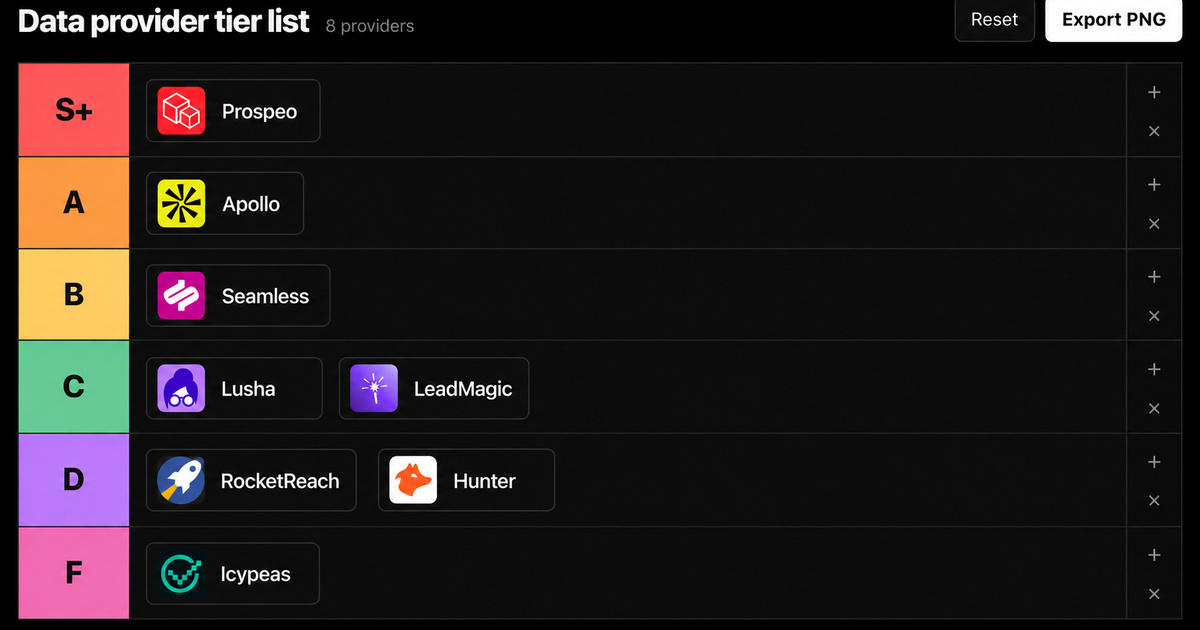
Most guides start with warmup tools and spam words. I start with the list, because that is where I have hard numbers. We ran the same 600 leads through 8 data providers and checked every email with an outside verifier. The unverified addresses hiding inside a valid label ranged from 1 to 63. That gap decides your bounce rate before you write a single subject line.
- Gmail and Yahoo ask every sender for SPF or DKIM and a spam rate under 0.3%. Gmail recommends staying under 0.10%.
- Bulk senders also need DMARC and alignment: about 5,000 a day for Gmail and Outlook, while Yahoo sets no public number. These rules cover personal inboxes. Google Workspace and Microsoft 365 business mailboxes sit outside them.
- Bad data is the fastest way to burn a domain: 1,000 valid-labeled emails from the worst provider we tested would send about 143 to addresses an outside verifier could not confirm.
- No inbox provider publishes a safe cold email volume. The top guides say 50 to 100 per mailbox per day.
- Check infrastructure first, then list, then volume, then copy. Fixing copy on a broken setup changes nothing.
 in
in
“We tested 600 leads on 8 tools and verified every email ourselves.”
What Is Cold Email Deliverability?
Cold email deliverability measures placement: how many of your messages land in the primary inbox of a real person. Delivery is a weaker number. A message counts as delivered even when it goes straight to spam. That is why a campaign can show 98% delivered and still get zero replies.
Three parties decide where your email lands. The receiving mail system, usually Google or Microsoft in B2B. The recipient, whose spam reports and replies feed the filter. And you, through the domain, the list and the volume you send. You control the third part completely and the second part through relevance.
What Do Gmail, Yahoo and Outlook Require in 2026?
Every sender to Gmail needs SPF or DKIM, valid DNS, a TLS connection and a spam rate below 0.3%. Bulk senders need SPF, DKIM and DMARC with alignment. Yahoo mirrors those rules. Outlook enforces the bulk rules for consumer inboxes and rejects failing mail with error 550 5.7.515.
One catch for B2B. Google says these guidelines do not apply to mail sent to Google Workspace accounts, and Microsoft's rules cover Outlook.com and Hotmail. Most cold email goes to company domains. Treat the rules as the minimum bar anyway: business filters check the same authentication and react to the same complaints.
| Rule | Gmail (personal accounts) | Yahoo | Outlook.com (consumer) |
|---|---|---|---|
| Authentication for all senders | SPF or DKIM | SPF or DKIM | Not published for low volume |
| Bulk threshold | About 5,000 a day to personal Gmail accounts | Bulk senders (no public number) | Over 5,000 a day |
| Bulk authentication | SPF, DKIM and DMARC, From domain aligned | SPF, DKIM and DMARC at least p=none, From domain aligned | SPF, DKIM and DMARC at least p=none, aligned |
| Spam rate | Below 0.3%, recommended below 0.10% | Below 0.3% | Not published |
| Unsubscribe | One-click for marketing and subscribed mail (bulk), 48 hours recommended, delivery support withheld if missed | One-click for marketing and subscribed mail, honored within 2 days | Recommended |
| In force since | February 1, 2024, rejections stepped up from November 2025 | February 2024 | May 5, 2025 |
Two details matter for outbound. Google says bulk sender status never expires: once a domain crosses the line, the stricter rules stay. And the 0.3% ceiling is small. At 1,000 emails a day, three spam reports put you on the edge. Cold email lives much closer to that line than newsletters do.
You can read the rules in full in Google's email sender guidelines, which also list the DNS and formatting requirements that sit underneath authentication.
Why Are My Cold Emails Going to Spam?
Cold emails go to spam when a filter reads one of four signals as risk. A sending domain it cannot authenticate. A list full of dead addresses. A sudden spike in volume. Or recipients marking the message as spam. The order matters. Check them in that sequence and stop at the first one that fails.
- Infrastructure. Is the mail leaving from a separate sending domain with SPF, DKIM and DMARC passing and aligned?
- List. Was every address checked by an outside verifier, with catch-all and guessed emails removed?
- Volume. Did any mailbox jump in daily sends, or start sending before it had any history?
- Copy and relevance. Would the recipient report it, because it reads like it went to 5,000 people?
Authentication passing does not mean the inbox wants your mail. It only proves who sent it. A clean DMARC report and a 14% bounce rate can sit on the same campaign. Identity is the entry ticket. List quality and relevance decide whether you stay.
How Much Does Bad Data Hurt Cold Email Deliverability?
A lot more than most founders think. In our 600-lead benchmark of August 3, 2026, every provider labeled some addresses as valid. An outside verifier then rejected between 0.25% and 14.3% of those labels, depending on the provider. Each rejected address is a likely bounce you would have sent.
| Provider | Unverified emails inside its valid label | Share of valid label that failed | Unverified addresses per 1,000 sends |
|---|---|---|---|
| Prospeo | 1 of 395 | 0.25% | about 3 |
| Seamless.AI | 4 of 391 | 1.0% | about 10 |
| LeadMagic | 3 of 264 | 1.1% | about 11 |
| Hunter | 3 of 239 | 1.3% | about 13 |
| Icypeas | 3 of 166 | 1.8% | about 18 |
| Apollo | 24 of 432 | 5.6% | about 56 |
| Lusha | 49 of 388 | 12.6% | about 126 |
| RocketReach | 63 of 440 | 14.3% | about 143 |
Read the last column as a projection from one batch. Your list will differ. The lesson travels anyway: a valid label is a vendor claim. If even half of that 14% bounced on a new mailbox, every provider would notice. A warmup tool cannot undo it after the send.
The full method, reach numbers and prices are in the lead generation database benchmark, including the six steps to rerun the test on your own records.
The rule from our benchmark works as a sending rule too. Nothing enters a sequence unless the provider says valid and a second, independent verifier agrees. Catch-all and guessed addresses stay out of the first send. You lose some reach. You keep the domain.
How to Set Up Sending Domains and Warmup
Buy a few domains that look like your brand, for example a variation of your company name, and point each one to your main website. Cold volume then never touches the domain your invoices and hiring emails depend on. Give every domain SPF, DKIM and DMARC before the first mailbox sends anything, and add a custom tracking domain if you track clicks.
Then warm up. Clay's guide suggests 3 weeks of warmup, starting at 5 warmup emails a day, adding 5 a day and capping at 50. Treat that as one vendor's practice. The principle is what matters: a mailbox with no history that suddenly sends hundreds of emails looks exactly like a spammer. Clay also spaces live sends 8 to 15 minutes apart per inbox, so volume never arrives in bursts.
Check blocklists when you set up and whenever bounces or replies move without an obvious reason. Free lookups such as MXToolbox show whether your domain or sending IP is listed. A listed sending IP or domain explains problems no copy change will fix. Many blocklists offer a delisting request once the cause is removed.
How Many Cold Emails Can I Send Per Day?
No inbox provider publishes a safe number for cold email. The only official threshold is the 5,000-a-day bulk line, which triggers stricter rules. Everything below that is practice from sending tools, and the guides ranking for this query disagree by a factor of two.
| Source | Recommendation | Date of the guide |
|---|---|---|
| Clay | Maximum 50 per inbox, 2 to 3 inboxes per domain, 3 weeks of warmup | April 23, 2026 |
| MailReach | Maximum 80 per sending address, one address per domain | Updated August 20, 2026 |
| Klenty | 10 to 20 for a new inbox, 80 to 100 for an established one | January 8, 2026 |
| Gmail, Yahoo, Outlook | No per-mailbox number. Bulk rules from about 5,000 a day | 2024 to 2025 |
The guides also disagree on domains. Clay puts 2 to 3 inboxes on each domain, MailReach one. I would take the low end and add mailboxes instead of volume. If you need 500 emails a day, ten mailboxes across a few sending domains at 50 each is safer than five mailboxes at 100. When one mailbox has a bad week, the rest keep working. Ramp new mailboxes slowly and keep them off your main company domain.
How to Improve Cold Email Deliverability: A 10-Point Check
Run this before every new campaign. The first five points protect your reputation. The last five keep it. Every item is binary on purpose. If you cannot answer yes, fix it before the send.
- Send from dedicated sending domains, never from the domain your company runs on.
- Publish SPF, DKIM and DMARC on every sending domain and confirm the From domain aligns.
- Confirm forward and reverse DNS and TLS. Google Workspace and Microsoft 365 handle this for you.
- Give new mailboxes a warmup period and a slow ramp before any campaign.
- Verify every address with an outside verifier. Drop catch-all, guessed and role addresses.
- Cap each mailbox at a fixed daily number and spread volume across mailboxes.
- Keep the first touch plain: no attachments, few links, and a custom tracking domain if you track clicks.
- Run the swap test: if the email still works with another prospect's name, rewrite it.
- Offer a one-line opt-out and honor it within 2 days, the window Yahoo requires for bulk senders.
- Watch spam rate in Google Postmaster Tools (personal Gmail recipients only), aim below 0.10%, and pause any campaign where bounces or complaints jump.
Point eight is the one people skip. Relevance is a deliverability lever because spam reports are the one signal Gmail and Yahoo put a hard ceiling on. Our outbound booked 689 meetings in 2026 by late August, and every email had to pass the swap test before it went out. Specific emails get replies. Generic ones get reported.
The swap test and its research steps are in cold email personalization at scale, including how to keep quality stable across large batches.
How Do I Test Cold Email Deliverability?
Test with three sources and trust none of them alone. Seed tests show where one message landed in a handful of test inboxes. Google Postmaster Tools shows your domain's spam rate and reputation at Gmail. Your own campaign data shows bounces, replies and unsubscribes by mailbox.
A seed test is a sample, and a small one. A single test inbox cannot tell you placement for every recipient, since filters also react to how each person engages with your mail. Use seed tests to catch a broken setup. Use Postmaster Tools and reply rates by mailbox to catch a slow decline.
Watch one warning sign closely: replies falling on one mailbox while the others hold steady. That usually points to the mailbox or its domain. The offer is the same for every mailbox. Pause it, check authentication and recent bounces, and resume at a lower volume.
Once the sending side is clean, the B2B lead list workflow shows how to build a list with a quality gate before it ever reaches a sequence.
When to Get Help With Cold Email Deliverability
Get help when the problem survives the checklist. Signs: bounces stay high after verification, one provider keeps rejecting mail, or a domain with a long history stops landing. At that point you need someone to read headers, logs and reputation data. More warmup will not fix it.
That diagnosis is exactly what our email deliverability consulting covers: infrastructure, authentication, pacing and the monitoring you keep afterwards.
Frequently asked questions
What is a good bounce rate for cold email?
Gmail, Yahoo and Outlook.com publish no official bounce limit. Aim for as close to zero as verification allows. In our 600-lead benchmark, the unverified share inside a provider's valid label ran from 0.25% to 14.3%. Verifying every address with an outside tool before sending is the cheapest way to stay at the low end.
Does cold email need DMARC?
For bulk mail to personal Gmail, Yahoo or Outlook.com inboxes, yes: all three require DMARC with at least p=none. Below that, Gmail and Yahoo require only SPF or DKIM. Business mailboxes have their own filters. A DMARC record takes minutes, so add it to every sending domain anyway.
Why do my cold emails go to spam when SPF and DKIM pass?
Authentication proves who sent the email. It says nothing about whether recipients want it. Spam placement after a clean check usually comes from list quality, a volume spike on one mailbox, or spam reports on generic copy. Check the list first, then daily volume per mailbox, then relevance.
How many cold emails can one inbox send per day?
No provider publishes a number. Top-ranking guides recommend a maximum of 50 (Clay), 80 (MailReach) or 80 to 100 for an established inbox (Klenty). Start new mailboxes far lower and ramp slowly. For more volume, add mailboxes and sending domains instead of pushing one inbox harder.
Can a burned domain recover?
Sometimes, with lower volume, a clean list and time. Often the honest answer is cheaper: move sending to fresh domains and protect the main company domain, which should never have carried cold volume. Fix whatever burned the first domain before you move, or the new one will follow.
Sources
Google, Email sender guidelines: requirements for all senders and bulk senders, in force since February 1, 2024, checked September 23, 2026.
Google, Email sender guidelines FAQ: definition of a bulk sender and the permanent classification, checked September 23, 2026.
Yahoo, Sender best practices: authentication, spam rate and unsubscribe rules, checked September 23, 2026.
Microsoft, Outlook's new requirements for high-volume senders: rules for senders over 5,000 emails a day, enforced from May 5, 2025.
Google, Postmaster Tools: spam rate and domain reputation data for mail sent to Gmail.
Clay, B2B cold email deliverability: volume, inboxes per domain and warmup ramp, April 23, 2026, read September 23, 2026.
MailReach, Cold email deliverability sending strategy: 80 per address, one address per domain, updated August 20, 2026.
Klenty, Cold email deliverability: 10 to 20 for new inboxes, 80 to 100 for established ones, January 8, 2026.
Federico Donatone, LinkedIn post of August 27, 2026: the 689 meetings figure and the swap test, published in partnership with Instantly.
Disclosure: the source post and the 600-lead benchmark were sponsored by Prospeo, a data provider Growth Cab uses and partners with. The post with the 689 meetings figure was an Instantly partnership. Every raw benchmark number is published so you can check it or rerun the test on your own list.


