








Use the evaluation protocol and synthetic test cases to compare a candidate with the working stack using explicit acceptance rules.
Build a GTM tech stack for AI by separating your account data, workflow rules and model provider. Define the output and acceptance checks for one revenue task, connect the required tools with limited permissions, and test the handoffs before adding more automation. A model change should trigger a controlled evaluation rather than a rebuild from memory.
The original LinkedIn post behind this article discussed expected model changes and what they might mean for our Claude-based setup. Those expectations were the context for the post. The practical question is how to preserve the work around a model as products change. I run Growth Cab, where that question affects research, outbound and reporting for B2B teams.
 in
in
“We built our whole core system on Claude this year. And I would still bet that GPT-6 ends it for Anthropic.”
How to Build a GTM Tech Stack That Outlasts One Model
The mistake I made for months was treating the model as the foundation. We picked Claude, we built on Claude, and every prompt, every workflow, every integration quietly assumed Claude. It felt like commitment. It was actually a single point of failure. The day a better model arrives, or the one you chose gets quietly worse, the whole thing is exposed.
If you want to know how to build an ai gtm stack that lasts longer than one release cycle, the first rule is uncomfortable. The model is the most replaceable part of the system, so you build it to be replaced.
Think of the model the way a good engineer thinks about a cloud region. You would never write code that only runs in one data center and can never move. You keep the thing that does the work separate from the vendor that happens to host it this quarter. The same logic applies here. The value your stack creates should live in the layers around the model, so that swapping the model is a small job instead of a rebuild.
What Are the Layers of an AI GTM Stack?
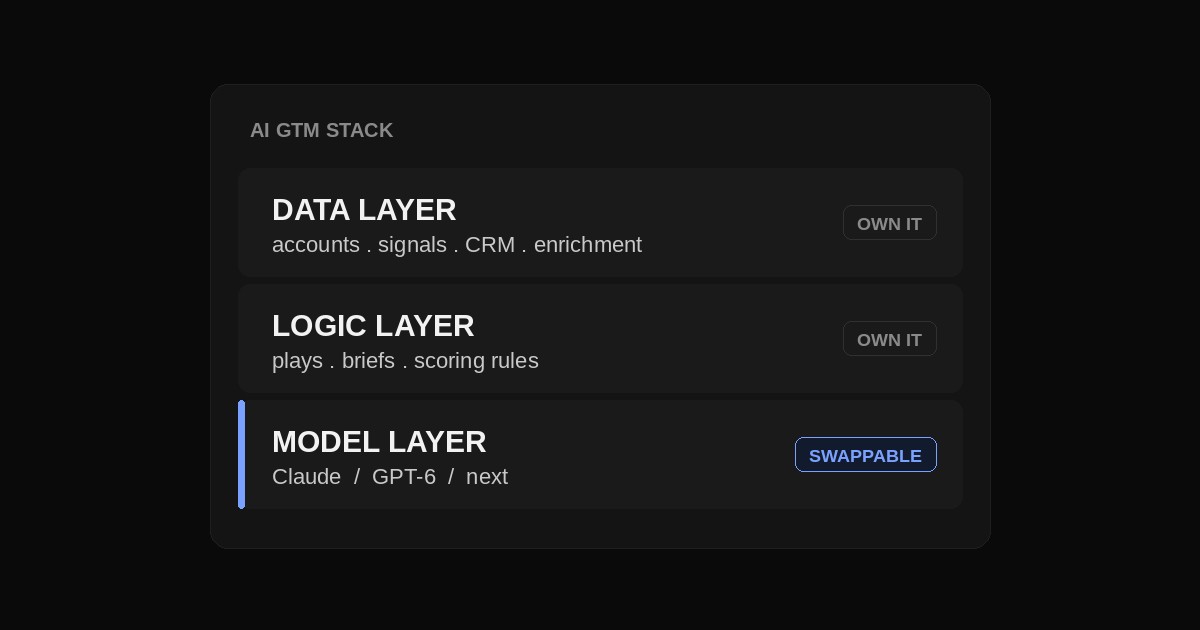
A useful way to organize the stack is into three layers: data, workflow logic and model execution. This is a working architecture for separating responsibilities, rather than a claim that every product follows the same structure.
The data layer is your accounts, your signals, your CRM, your enrichment. It is the slowest to build and the most valuable, and it has nothing to do with which model you run. Own it completely. If your data only exists inside a vendor's tool, you do not have a data layer. You have a rental you can be evicted from.
The logic layer is your actual plays: how you score an account, brief a research task and decide what happens next. Keep those rules in readable, versioned instructions alongside structured input and output definitions. Moving to another model still requires tests, but the business rules remain available to your team.
The model layer executes the task through the tools you allow it to use. Keep provider-specific settings behind a clear interface. Models can differ in format, quality and tool behavior, so a replacement needs to pass the same acceptance checks before it takes over live work.
Use the GTM tools directory to shortlist tools for a defined job after mapping these layers. For each candidate, record its input, output, system of record, human owner and failure path. A tool that combines research and outreach still needs a checked handoff between those jobs; a longer feature list does not establish a better fit.
What Building It This Way Looks Like on a Revenue Team
On a normal morning our stack runs four jobs. One agent researches a fresh account list. One drafts first touch emails off that research. One reads yesterday's reply data. One writes the pipeline note. None of those jobs is welded to a particular model. The brief for each one is written in plain language and stored where we control it.
When we tested a different model last month, moving one of those jobs across took under an hour, because the job was defined by our logic rather than by the tool.
Some agent jobs depend on others, like drafting from fresh research. My guide to AI agent orchestration covers which jobs can run in parallel and which must wait for accepted research.
Contrast that with the version of us from a year ago. Back then the research prompt had model specific phrasing baked into it, the reply parser assumed one output format, and nobody had written down why the account scoring actually worked. Moving anything meant rebuilding it from memory. That is the real cost of hardwiring a model. The real cost is not the license fee. It is the rebuild you pay for in lost weeks.
There is a quieter benefit too. When your logic lives outside the model, it accumulates. Every good brief we write gets reused and sharpened, and it keeps working no matter which engine runs it. A stack that is welded to one vendor cannot compound like that, because half of what it knows is trapped in a place you do not own.
Outside sales, my 15-tool AI stack follows the same idea: the briefs, rules and data belong to the company, whichever vendor runs the job.
Build One Account-to-Draft Workflow First
Start with a single task: prepare an account brief and a draft outreach message for human review. Input a company domain, target buyer role, your offer and exclusion rules. The expected output should contain the account identity, sourced facts, a relevant hypothesis, unresolved questions and a draft that uses only the checked brief.
The research step records a URL and observation date for each external fact. A validation step checks that the source supports the claim and that the company and person match. Missing evidence returns the record to research; it does not become a confident sentence in the draft. Keep inference separate from fact so the reviewer can assess it.
Pass accepted briefs to the writing step with the offer and voice examples. Apply the single-email review and swap test before accepting a draft. A workflow that prepares a message has not verified an email address, updated a CRM or sent anything; each additional action needs its own permission and completion check.
Give every run an identifier and record its stage, accepted output and unresolved errors. If a tool times out, inspect whether the intended action already happened before retrying it. Make repeated actions safe where possible, and route ambiguous results to a person. These controls matter even when each individual model response looks correct.
Test a Model Change Without Losing the Working Version
Keep a fixed set of ordinary and difficult accounts, then run the candidate beside the current workflow. Compare factual accuracy, accepted drafts, correction time, latency and total cost. Our LLM regression testing workflow explains how to preserve that baseline and catch quality changes.
Include cases with sparse information, conflicting sources and unavailable tools. Start with drafting or another reversible task, keep the previous version available and expand only after the candidate meets your acceptance criteria. This is a proposed evaluation process; no new model benchmark or deployment result is claimed here.
Where Building an AI GTM Stack This Way Breaks Down
Portability takes work and does not solve every reliability problem. Three limits matter in practice.
The first is that models are not interchangeable at the edges. The same brief can produce different formats, judgments and failure modes. Keep representative examples and compare the candidate with the working version. Investigate regressions in the full workflow, including tools and settings, before attributing them to the model.
The second is optimization. Provider-specific prompts and features can be useful, but they increase the work needed to switch. Keep those adaptations explicit and measure their effect on your tasks. This article does not establish a universal percentage trade-off between quality and portability.
The third is discipline. It is easy to let workflow rules live only inside a tool’s memory. Keep instructions, examples and operating decisions in a place the team controls, and review changes when the workflow starts depending on a provider-specific feature.
The practical goal is to preserve your data, rules and evaluation cases while giving yourself a controlled way to change the execution layer. You can then assess a new model on the work your team needs instead of betting the operation on a product announcement.
Use the sales stack consolidation test before removing an existing tool from the architecture.
Every Wednesday, AI Frontier shares one signal, my read on it and one practical play from the systems we run at Growth Cab. The original LinkedIn post remains linked above as the historical starting point for this guide.


