








To learn how to use Seedance 2.5, start with one visible outcome. Choose the generation mode, give every reference one job, describe the action in time order, generate a short baseline and review motion, identity, audio and framing. Change one variable per retry. That keeps a fast experiment from turning into expensive prompt roulette.
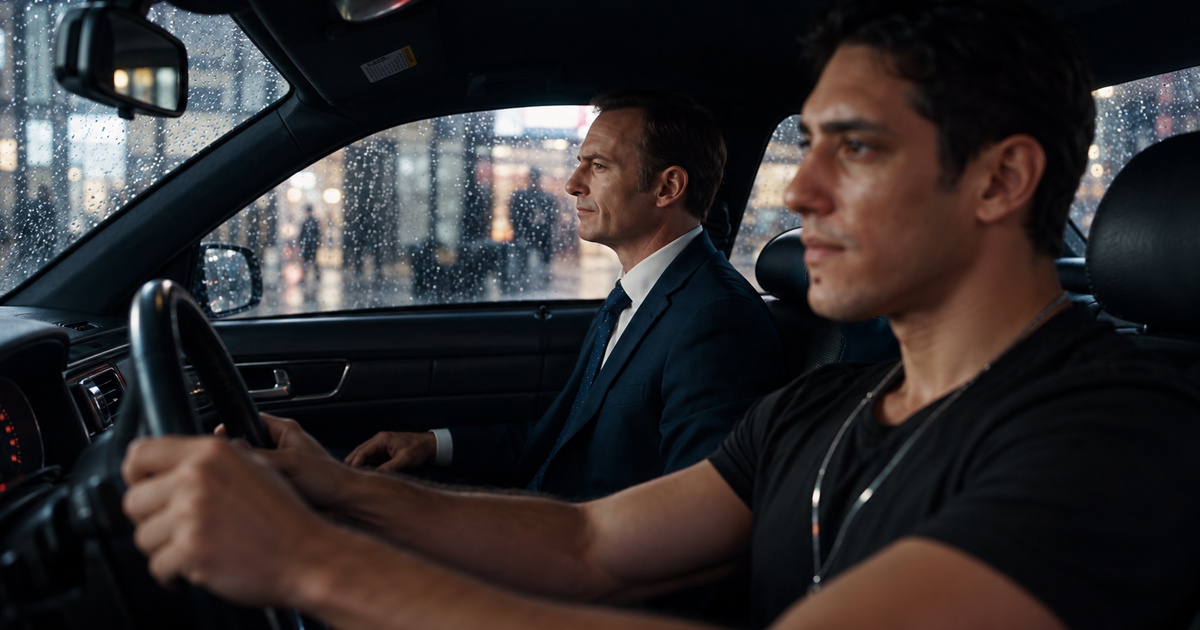
I reached that conclusion after making the car scene in the source post in less than ten minutes. The post drew 268 reactions and 108 comments. That single run proves the workflow can be fast. It does not prove every prompt will work first time, or that one impressive clip is ready for a paid campaign.
 in
in
“If this is AI slop, keep serving it. Seedance 2.5 was Mythos moment of video models.”
How to Use Seedance 2.5 in Five Steps
- Write one sentence describing what the viewer must see happen.
- Choose text, image, video or multimodal reference mode before writing details.
- Assign one clear responsibility to every reference asset.
- Direct the sequence with visible actions, camera behavior and timed audio cues.
- Review the exported clip against a fixed checklist and revise one variable.
That is the complete loop. The model can carry more material than most creators should use on attempt one. Start small enough to know why the result worked. A clean baseline with one subject, one action and one camera move teaches you more than a crowded prompt with twelve creative instructions competing for the same thirty seconds.
1. Define the Shot Before the Prompt
Write the outcome as something a reviewer can point to on screen. Try: the driver crosses a rainy city while the passenger realizes they are no longer on Earth. The sentence contains a subject, an action, a setting and a turn. A direction such as make it cinematic gives the model taste words without a finish line.
Then split the clip into beats. For a twenty-second scene, I might use four seconds for the setup, eight for the conversation, four for the reveal and four for the reaction. The numbers are guidance rather than frame-accurate edit points. Their job is to stop the ending from consuming the entire generation.
ByteDance's official Seedance 2.5 launch note says the model can generate up to 30 seconds in one pass and supports multi-round extension.
2. Choose the Right Seedance 2.5 Mode
Use text-to-video when you want a new world and can tolerate visual exploration. Use an image when appearance and the opening composition matter. Use first and last frames when the visual journey has two fixed anchors. Use reference mode when a person, product, movement, camera pattern or sound must influence the output.
To prepare that reference image, my ChatGPT photo editing guide shows how to change one detail without losing the face.
Editing and extension are different jobs. Editing changes a selected part of an existing clip. Extension continues the timeline while trying to preserve continuity. Pick the job before you add references because a locked input can determine aspect ratio, timing and composition. A vague mode choice makes later prompt detail fight the source material.
The current Runway Seedance 2.5 guide exposes text, image, reference, edit and extension workflows on one production surface.
3. Give Every Reference One Job
Label the assets in the prompt. Reference image one owns the passenger's face and suit. Reference video one owns the car movement and camera vibration. Reference audio one owns the rhythm and ambience. State which details must remain faithful and which are mood references. Without that map, the model has to guess which source wins when two inputs disagree.
ByteDance says one generation can accept up to 30 images, 10 video clips and 10 audio clips. Treat those limits as capacity, rather than a target. Every added asset creates another relationship the model must resolve. I would begin with the minimum set that locks identity, motion and sound, then add one source only when a specific gap remains.
ByteDance documents the 30-second storytelling, reference control and editing focus on the official model page.
4. Direct Action, Camera and Audio in Order
Write what happens in the order the viewer experiences it. Name the opening frame, the main action, the camera response, the transition and the final state. Add dialogue or sound beside the moment that triggers it. This reads like a compact directing note. It gives the model a timeline it can stage instead of a bag of adjectives.
Keep camera language observable. Slow push toward the passenger is clearer than dramatic camera. Handheld movement with small vertical vibration is clearer than raw energy. If a specialist term matters, follow it with the visible effect you expect. The reviewer should understand the instruction without knowing film-school vocabulary.
For the first run, protect the essentials with a short constraint line: preserve both identities, keep hands anatomically correct, avoid subtitles, keep dialogue intelligible and hold the requested aspect ratio. Long negative lists can become another source of noise. Put your attention on the few defects that would make the shot unusable.
5. Review the Clip Before You Regenerate
Watch once without sound and once without picture. The silent pass reveals motion, continuity, faces, hands, product geometry and framing. The audio pass reveals dialogue timing, ambience, music and unwanted artifacts. Then watch the complete clip and ask whether the story still lands for someone who never saw the prompt.
- Does the required event happen clearly?
- Do subjects and products remain recognizable across shots?
- Are hands, faces, contact points and object physics believable?
- Does the camera support the story without hiding the action?
- Is speech understandable and synchronized?
- Does the final frame create a usable ending?
- Do you have the rights and permissions needed to publish every reference?
Record the prompt, model route, mode, duration, aspect ratio, references and accepted defects beside the file. If the clip fails, name one cause and change one variable. Changing prompt, references, duration and mode together may improve the output, but it destroys the lesson. You will have a new result without knowing which decision produced it.
BytePlus lists the current Seedance 2.5 API inputs and output limits, including 4 to 30 seconds, 24 fps and 480p or 720p on that route. Other providers can expose different output options, so check the surface you actually use.
What My Ten-Minute Example Proves
The example proves that one person can move from an idea to a coherent thirty-second scene quickly. It also shows why the source post called the output worth serving. The scene carries two recognizable characters, a rainy car interior, a clear camera language and a complete beat. That is much closer to a directed sequence than an isolated moving image.
It does not establish an average generation time, an accepted-shot rate or commercial reliability. I did not preserve the original prompt and settings beside the LinkedIn post, so I will not reconstruct them as fact. The useful evidence is the finished clip, its thirty-second duration and the observed claim that the creation took less than ten minutes.
Where Seedance 2.5 Still Needs a Human
A creator still owns the brief, references, permissions and acceptance decision. High visual quality can hide a broken product detail, an inconsistent person or an edit that changes the meaning of a scene. Real faces and protected characters add legal and platform risk. A model output should enter the same review path as footage from any other production source.
The tool is also a poor substitute for an undefined idea. If the team cannot agree on the event, audience and ending, a longer prompt only makes the disagreement harder to see. Lock the creative decision first. Then use the model to explore execution quickly, with a review rule that can reject a beautiful clip when it misses the job.
Use the AI model evaluation scorecard to compare accepted output rate, correction time, latency and total cost on the video work you actually publish.
The Practical Seedance 2.5 Workflow
Start tomorrow with one shot that matters. Write the visible outcome, choose the mode, attach only the references needed to lock it and direct the beats in order. Generate a short baseline. Review it with the seven checks. Save the evidence, change one variable and stop when the clip meets the purpose.
That process keeps the speed that made my first example exciting while adding the discipline a business needs. Seedance 2.5 can turn a directing note into a surprisingly complete scene. Your advantage comes from knowing what the scene must accomplish, what evidence makes it acceptable and which attractive failures still deserve a rejection.


