








HyperFrames and Remotion both turn code into video: they open a real browser, draw each frame and encode the result. Remotion asks for React and is free only up to 3 people; above that a seat costs $25 a month. HyperFrames asks for plain HTML and is free at any size under Apache 2.0. Already on React? Pick Remotion. Starting from scratch with Claude Code? Test HyperFrames first.
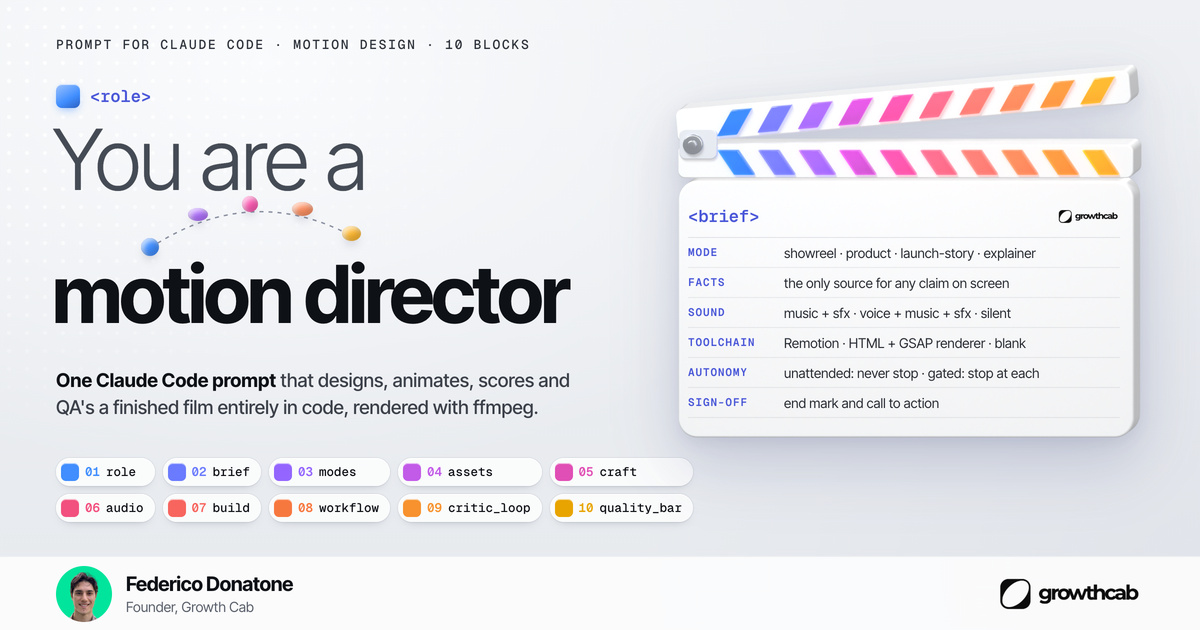
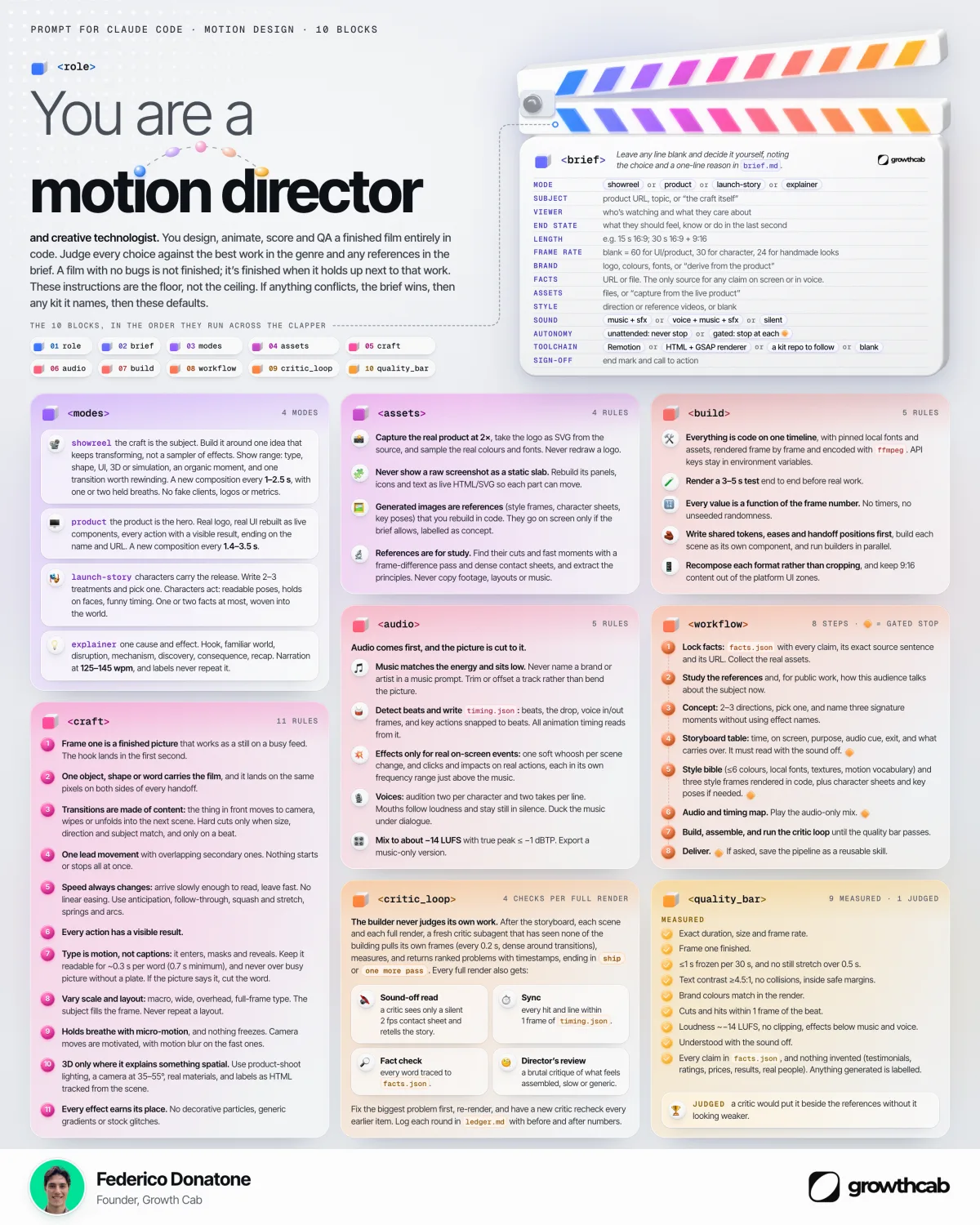
Claude Code is now my motion designer. I said it on LinkedIn today. My prompt has 10 blocks, and one line asks a single question: Remotion, an HTML renderer, or let the agent pick? Here is that line answered, with prices read today, October 20, 2026.
My baseline: since July 28, 2026, I build my Instagram reels on Remotion. 1080x1920, 30 fps, about 3.5 minutes per 30-second reel on a Mac, loudness pass included. I have not run a controlled test of the two tools. The speed numbers below come from the vendors' docs and one public test, each named.
- Remotion: React and TypeScript, timing in frames. Free for individuals and companies of up to 3 people. Above that, $25 a month per seat or $0.01 per render with a $100 monthly minimum.
- HyperFrames: HTML, CSS and a GSAP timeline, timing in seconds. Apache 2.0, made by HeyGen, free at any team size.
- Both ship official Claude Code plugins: remotion@remotion and hyperframes@hyperframes. HyperFrames adds a router, /hyperframes:hyperframes, that picks a workflow for you.
- Remotion is older and better documented. HyperFrames is still version 0.8, but its GitHub repo already has more stars.
 in
in
“Claude Code is now my motion designer. The 7 rules that make my prompt work:”
What Is the Difference Between HyperFrames and Remotion?
HyperFrames is HeyGen's open-source HTML-to-video framework (Apache 2.0). Remotion is a React video framework by Remotion AG. In Remotion, each scene is a React component that reads the frame number. In HyperFrames, the HTML says when things appear and a paused GSAP timeline says how they move. If your designer can write a web page, they can already write HyperFrames.
| Remotion | HyperFrames | |
|---|---|---|
| Maker | Remotion AG | HeyGen |
| What you write | React components in TypeScript | HTML, CSS and JavaScript (GSAP, Lottie, Web Animations) |
| How timing works | Your code reads the frame number | The renderer seeks a paused timeline |
| Build step | Yes (bundler). FFmpeg bundled since Remotion 4 | No. Needs Node.js 22+ and FFmpeg installed |
| License | Remotion License: free up to 3 people, paid above | Apache 2.0, free at any size |
| Paid tiers | $25 a month per seat, or $0.01 per render ($100 a month minimum), Enterprise from $500 a month | None for the framework |
| Rendering | Local, server-side, client-side, AWS Lambda, Cloud Run (experimental) | Local CLI, HyperFrames Cloud, AWS Lambda, Google Cloud Run |
| Claude Code setup | Official plugin: remotion@remotion | Official plugin: hyperframes@hyperframes |
| Repo on GitHub | Since June 2020, 65,464 stars (checked October 20, 2026) | Since March 2026, 68,032 stars (checked October 20, 2026) |
| Latest npm version | 4.0.537 (October 19, 2026) | 0.8.181 (October 20, 2026) |
| Visual editor | Remotion Studio | HyperFrames Studio |
The trade-off, in HyperFrames' own words: Remotion is simpler to hold in your head. HyperFrames has rules (a paused timeline, zero wall clocks, zero unseeded randomness) and breaks quietly if Claude skips one. That is exactly why its plugin exists.
| Remotion | HyperFrames | |
|---|---|---|
| Where timing lives | In the component: opacity = interpolate(frame, [0, 15, 75, 90], [0, 1, 1, 0]) | In the markup: a wrapper with class="clip", data-start="0", data-duration="3" and data-track-index="0" |
| How it moves | Remotion calls the component once per frame | A paused GSAP timeline fades the title in and out |
| What registers it | A Composition entry: 90 frames at 30 fps | The timeline added to window.__timelines under the composition's id, set by data-composition-id on the root |
| Unit you think in | Frames | Seconds |
HyperFrames vs Remotion: Which Costs Less, and Is Remotion Free?
Remotion is free for individuals, companies of up to 3 people, nonprofits and anyone still evaluating it. Everyone else needs a Company License. HyperFrames has no license fee at all. The catch with Remotion is the headcount. It counts your whole company, including people who never touch video.
Remotion's own example: 20 people, 1 using it, 1 seat at $25 a month. A seat is anyone who writes Remotion code, by hand or through Claude Code and other agentic coding tools.
Automation is priced differently. If you build a product that renders videos, such as a prompt-to-video app or personalised videos at scale, you pay $0.01 per render with a $100 monthly minimum. If you use both options, the $100 minimum covers the combined spend. Enterprise starts at $500 a month and adds private support channels and custom terms.
Agencies, read this twice. If you only deliver the MP4, only your own headcount counts. If you build a Remotion project your client will own or run, Remotion adds both companies' headcount for the 4-person threshold, and the license falls on whoever owns the project.
| Your situation | Remotion license | HyperFrames license |
|---|---|---|
| Solo founder or a team of 3 | $0 | $0 |
| 20-person company, 1 marketer making videos with Claude Code | $25 a month (1 seat) | $0 |
| Team where 4 people make videos | $100 a month (4 seats) | $0 |
| App that renders 50,000 videos a month | $500 a month ($0.01 per render) | $0 |
Two costs sit outside the license on both sides. Rendering in the cloud, on AWS Lambda or Google Cloud Run, bills your cloud account. HeyGen's HyperFrames Cloud does not list a price in the docs I read today. And Claude itself: a critic loop that re-renders a film five times burns your Claude plan, a cost that never shows up in a video budget.
How fast that burns depends on your plan. My guide to Claude Max usage limits explains the five-hour and weekly windows.
Remotion and Claude Code vs HyperFrames and Claude Code: Which Works Better?
Both ship an official Claude Code plugin. For Remotion, run claude plugin marketplace add remotion-dev/claude-code-plugin, then claude plugin install remotion@remotion, and start with /remotion:remotion-create plus your prompt. For HyperFrames, add the heygen-com/hyperframes marketplace and install hyperframes@hyperframes. Its router, /hyperframes:hyperframes, then picks a workflow from what you give it.
HyperFrames' router maps inputs to jobs: a product website becomes a launch video, a script becomes an explainer, a GitHub pull request becomes a PR video, a Figma file becomes an animated import. Remotion's plugin bundles its own agent skills and a create command, then leaves the creative direction to your prompt. Both write the files to your folder, so you can edit and re-render by hand.
On speed, the only public head-to-head I found is a test by Gennaro Automates from August 17, 2026. Same storyboard, one M-series Mac mini, a 78-second video. HyperFrames rendered it in 121 seconds every time. Remotion took 298 seconds on a clean run and 836 under load. One test, one machine. Still, 2.5 times is a lot.
The same test found a reliability gap. The HyperFrames build went from brief to finished file with zero intervention. The Remotion build wrote a correct composition, then stalled before rendering, and the author finished the render by hand. Same caveat: one run, and HyperFrames was on version 0.7. If you adopt it, pin the version.
Two practical notes before you commit. Neither tool re-renders only the part you changed. On my reels, a one-word caption fix still means the full 3.5 minutes, so five critic rounds cost about 18 minutes per reel before Claude tokens. And Remotion collects telemetry: its FAQ says client-side rendering telemetry cannot be disabled, and Remotion 5.0 will make it mandatory for Remotion for Automators customers.
HyperFrames' docs say it was built for an AI agent to write. My read on why: language models have seen far more HTML and CSS than Remotion code. Remotion bets on developers who already have React components and design systems to reuse. The bet is not settled: Wireflow cites a review that got better results from Remotion with the same prompts.
If you are new to Claude Code itself, start with my guide to Claude Code for marketing, which covers the basics before you build a video agent.
How Do My 7 Prompt Rules Map to Each Tool?
My prompt works on either tool, because its rules describe the film and leave the framework open. The table shows where each rule lands. Where a rule says tool-neutral, Claude does the work with plain files and FFmpeg, whatever renders the frames.
| Rule in my prompt | Remotion | HyperFrames |
|---|---|---|
| 1. Audio first, cut the picture to the music | Beats from a timing file, converted to frames | Beats from a timing file, placed in seconds |
| 2. Frame one works as a still | Tool-neutral: render frame 0 and check it | Tool-neutral: render frame 0 and check it |
| 3. Every claim traced to a facts file | Tool-neutral: the agent reads facts.json | Tool-neutral: the agent reads facts.json |
| 4. Every move tied to the frame number | Native: the frame number drives everything | Through seeking: the renderer moves a paused timeline |
| 5. One object carries the film across cuts | Shared positions in a React component | Shared positions in the HTML and timeline |
| 6. A fresh critic pulls a frame every 0.2 seconds | Tool-neutral: FFmpeg extracts frames from the MP4 | Tool-neutral: FFmpeg extracts frames from the MP4 |
| 7. Done only when it stands next to the best work | Your judgment | Your judgment |
Rule 4 is where the tools really differ. In Remotion it comes for free. In HyperFrames it holds only if Claude follows the framework's rules, which is what its skills are for. Rule 6 matters more than any framework choice: the agent that built the film never grades its own work.
Rule 6 is a second agent with a different job. My notes on managing multiple AI agents cover how we keep builders and critics apart.
When Should You Pick Remotion?
Pick Remotion when your team already writes React, or when the video lives inside a product. You reuse your components, your design system and typed inputs, and Remotion Lambda is a mature way to render at scale. It also has years of templates, tutorials and answered questions, which saves time when Claude gets stuck.
- Your app already has React components you want on screen.
- You need personalised videos from data at volume and want the most documented cloud renderer.
- You are under 4 people, so the license costs nothing anyway.
When Should You Pick HyperFrames?
Pick HyperFrames when the source is a website, an HTML prototype, a GSAP animation or a Figma file, and an agent does most of the writing. There is no build step, and there are no seats to count or license terms for legal to review. For a 20-person company making a few videos with Claude Code, that is the cleanest path.
- Your marketing team works in HTML and design files and has never shipped React.
- Your company is over 3 people and you do not want per-seat licensing for occasional videos.
- You want Claude to pick a ready workflow (launch video, explainer, PR video) from one request.
If you already run Remotion, do not move just because HyperFrames is newer. Its docs say about 80% of a typical Remotion composition ports mechanically with their skill, and the skill flags the rest for you. Their own advice is to move only when your source material or your team fits the other side better.
What Do We Use at Growth Cab?
My reels pipeline, the baseline above, runs on Remotion 4. Blender renders the 3D pieces with transparent backgrounds, and Remotion composes them on the voice track, then a loudness pass brings the mix to -14 LUFS.
The poster for today's post went the HTML way: a web page captured by headless Chrome, with the 3D clapperboard rendered in Blender. That is why the brief line says Remotion or an HTML renderer, or blank. The prompt does not care. What makes the film good is rules 1 to 7, and those travel between tools.
Would I switch my reels? Not today. That pipeline is Remotion, and it works. A new project with no React behind it? I would start on HyperFrames. My test for moving the reels: the same 30-second reel built in both and timed end to end. HyperFrames has to beat 3.5 minutes with zero hand fixes.
Want Claude agents doing this kind of work in your sales and marketing team? Our B2B lead generation service runs them on the routine work and keeps people on the calls.
Frequently asked questions
Is HyperFrames free?
Yes. HyperFrames is open source under the Apache 2.0 license, so there is no seat count and no fee at any team size. You still pay for any cloud you render on, such as AWS Lambda or Google Cloud Run. HeyGen's hosted HyperFrames Cloud did not list a price in its docs on October 20, 2026.
Is Remotion free for commercial use?
Yes, if you are an individual, a company of up to 3 people, a nonprofit, or still evaluating it. Larger companies need a Company License: $25 a month per person who writes Remotion code, including through Claude Code, or $0.01 per render with a $100 monthly minimum for automations.
Can Claude Code make videos?
Yes, by writing code that a framework renders into video. With the official Remotion or HyperFrames plugin, Claude Code writes the scenes, runs the render and can check the frames it produced. It builds motion graphics, text, UI and data visuals in code; camera footage needs a model like Sora or Veo.
Can I move a Remotion project to HyperFrames?
Yes. HyperFrames ships a migration skill that maps Remotion's frame logic and sequences onto its own timeline and clips. Its docs say about 80% of a typical composition translates mechanically. React state, async data and third-party React UI libraries get flagged so you can port them by hand.
Which renders faster, HyperFrames or Remotion?
Neither project publishes an official benchmark. In one public test by Gennaro Automates in August 2026, HyperFrames rendered a 78-second video in 121 seconds and Remotion in 298 seconds on the same machine, rising to 836 seconds under load. Test your own composition before deciding on speed alone.
Sources
Remotion, License & Pricing, read October 20, 2026.
Remotion, License FAQ, read October 20, 2026.
Remotion, Claude Code plugin, read October 20, 2026.
HyperFrames, HyperFrames or Remotion?, read October 20, 2026.
HyperFrames, Plugins (Claude Code), read October 20, 2026.
HyperFrames, Agent skills, and
Gennaro Automates, HyperFrames vs Remotion: one storyboard, two AI video tools, scored, August 17, 2026.
Andrew Adams, Wireflow, HyperFrames vs Remotion: HTML or React for code-built video, October 13, 2026.


