
To build an AI agent with Claude, install Claude Code, write one plain-English file that tells the agent its job and its rules, connect the tools it needs, and give it a trigger: a schedule or a message from you. You do not need a framework or an agent app. Claude does the reasoning, the file holds your judgment.
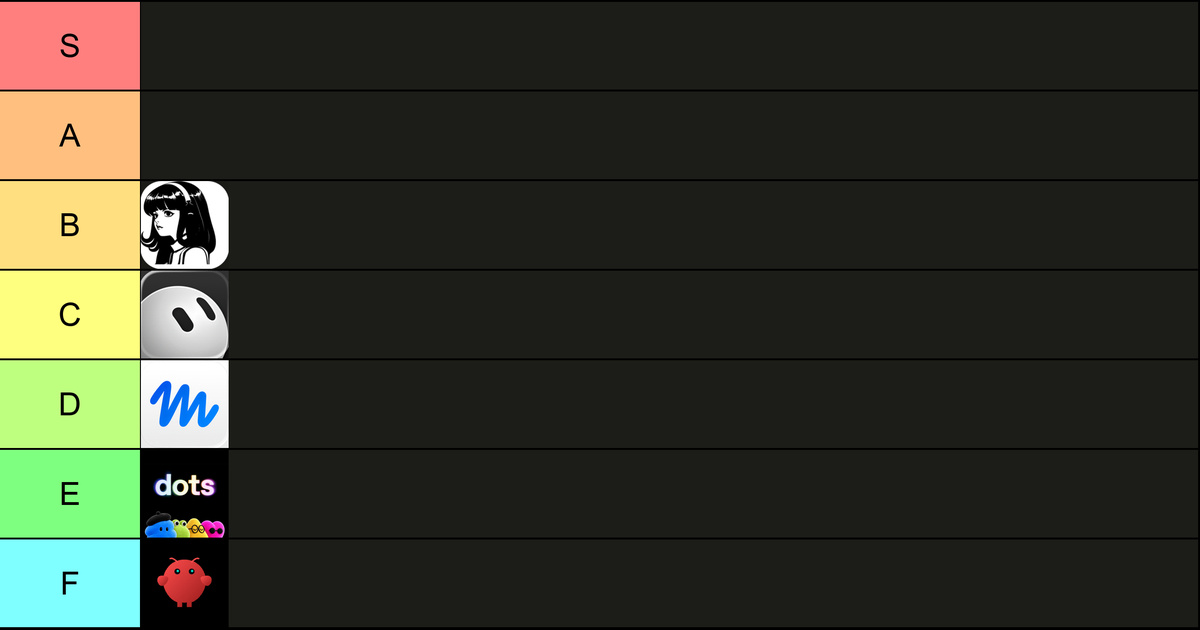
On October 5, 2026, I posted a tier list on LinkedIn of the AI agent apps everyone is talking about. My tiers S and A stayed empty. My point was simple: the best agent is the one you build yourself. This guide is the long version, with the parts you need, the order to build them in and the limits I have hit.
- Claude Code is the harness: it reads files, runs commands and connects to your tools through MCP.
- The heart of the agent is a rules file, CLAUDE.md, written in plain English and loaded at the start of every session.
- Add three things in order: tools, a trigger, then a chat channel such as WhatsApp.
- An agent that adds a dated rule after each mistake stops repeating that mistake.
- Claude Code comes with every paid Claude plan, starting with Pro.
 in
in
“Every AI agent app is useless. The best agent is the one you build yourself.”
What Does It Mean to Build an AI Agent With Claude?
An AI agent is a model that works in a loop: it reads the situation, picks an action, uses a tool, checks the result and repeats until the job is done. Building one with Claude means you supply the job, the rules and the tools. Claude supplies the loop.
You can build the loop yourself with the Claude Agent SDK if you write code. Most founders I talk to should not start there. Claude Code already runs the loop for you, on your machine or in the cloud, and you steer it with text files. That is how I built the nine agents that run our GTM.
If you are unsure whether you need an agent at all, my guide to AI agents vs prompts helps you pick between a prompt, a workflow and an agent.
Why Build Your Own Agent Instead of Using an Agent App?
Because an agent app decides three things for you: which model thinks, where your data lives and what happens when it breaks. When you build on Claude Code, you decide all three. Here is how I ranked five apps in my post, with the reason behind each grade.
| App | What it is | My main problem with it |
|---|---|---|
| Muse | Meta's personal agent app, launched September 2026 | Your company data goes to the firm the FTC fined $5 billion over privacy in 2019 |
| Grok Bot | xAI's always-on agents, in beta since August 2026 | It runs on Grok 4.7, which xAI says it trained to understand the Grok Bot harness, and I find that model weak |
| Hermes Agent | Open-source agent by Nous Research | It breaks every week for me, and running Claude needs an API key, or a Max plan with extra usage credits, unless you use an experimental plugin |
| OpenClaw | Open-source personal agent | Its creator joined OpenAI in February 2026, and it promises more than it delivers: it crashes for me |
| Dots | OpenAI's personal agents, launched September 29, 2026 | When I called mine, it took about 30 seconds to pick up |
None of these apps is worthless for everyone. My problem is the trade. You rent someone else's rules, someone else's model choice and someone else's release calendar. My take: start with Claude Code, and buy an agent app only if it does something your own build cannot.
What Do You Need to Build an AI Agent With Claude Code?
You need six parts, and only the first three are required on day one. Each part is a decision, and each one maps to a feature that Claude Code already has.
| Part | What it does | How you add it in Claude Code |
|---|---|---|
| 1. Model | Does the thinking | Pick Claude Opus 5.5 for hard judgment calls |
| 2. Harness | Runs the loop and the tools | Claude Code in the terminal or desktop app |
| 3. Rules file | Job, voice, limits, examples | CLAUDE.md in the project folder |
| 4. Tools | Email, calendar, CRM, files | MCP servers and connectors |
| 5. Trigger | When it wakes up | Desktop scheduled tasks, cloud routines or headless runs with claude -p |
| 6. Channel | Where you talk to it | A chat bridge such as WhatsApp or Slack |
For the business goal that should sit at the top of that rules file, see my guide to AI agents for small business.
How Do You Build an AI Agent With Claude, Step by Step?
Start with one boring job you do every week, and let the agent do it while you watch. The steps below are the order I follow for every new agent. Most steps take minutes, and you can stop after step four and already have something useful.
- Pick one recurring job with a clear finish line, such as a Monday pipeline summary.
- Create a folder for the agent and open Claude Code inside it.
- Run /init and turn the generated CLAUDE.md into the rules file below.
- Do the job once together, correcting the agent out loud as you go.
- Ask Claude to save the working steps as a skill, so it can repeat them.
- Connect the one tool the job needs through MCP, with read access first.
- Put it on a schedule, and add an approval step before anything leaves your company.
What Goes in the Agent's Rules File?
The rules file is where your judgment lives, so write it like a brief for a sharp new hire. Claude Code loads CLAUDE.md at the start of every session, which means every run starts from the same instructions. Keep it short and concrete, and add a rule every time the agent gets something wrong.
- Job: one sentence on what the agent produces and for whom.
- Inputs: the exact files, folders or tools it reads from.
- Voice: how it writes, with two real examples of your own writing.
- Never: the actions it must not take, such as sending email without approval.
- Done means: the checks that prove the job is finished.
- Mistakes log: dated lessons it adds after each correction.
| Section | Example line |
|---|---|
| Job | Every Monday at 8:00, write a one-page pipeline summary for the founder. |
| Inputs | Open deals in the CRM, read only. Last week's call notes in /notes. |
| Voice | Short sentences, first person plural, numbers before adjectives. |
| Never | Send email, change a deal stage or delete a file. |
| Done means | Every open deal is listed with its next step, owner and date. |
| Mistakes log | YYYY-MM-DD: listed a closed deal as open. Check the stage field first. |
The last section matters most. Our blog agent keeps a list of false successes in its playbook: moments when a step looked done and was not. Each entry says what happened and how to check for it next time. Every entry turns a past mistake into a check the next run performs before it says it is finished.
How Do You Make a Claude Agent Learn From Its Mistakes?
You give it permission to edit its own rules file, and a habit of doing it. After every correction, the agent writes one dated line: what went wrong and the check that would have caught it. Claude Code also keeps some notes of its own, but the lessons you want applied on every run belong in the file you control.
Two guardrails keep this healthy. First, keep rules short and remove the ones that no longer apply, or the file turns into noise. Second, review the diff once a week. An agent that writes its own rules can also write a bad one, and you want to catch that before it runs a hundred times.
When one agent's job grows, split it. Claude Code can hand a narrow task to a subagent with its own context and its own tool limits. The main agent stays focused, and each subagent's rules stay short enough to read in a minute.
When you run several agents that share files, the coordination rules matter as much as the agent files. My notes on managing multiple AI agents cover owners, shared writes and recovery.
Should Your Claude Agent Get Its Own Computer?
Yes, once it works without you watching. A separate machine or virtual machine gives the agent a clean place to install tools, keep logins and run at night, away from your personal files. If something goes wrong, the damage stays inside that box.
Start with the narrowest access that lets the job get done. Give read access before write access, and use separate accounts where you can. The rules file guides the agent but does not enforce anything. For a hard stop on an action, the Claude Code docs point to hooks, which can block a tool call before it runs.
How Do You Talk to Your Agent From WhatsApp?
You connect a chat bridge that passes your messages to the agent and its answers back to you. This is the step that makes an agent feel like a colleague. Our content agent drafts five LinkedIn posts a week, and I edit and approve each one on WhatsApp.
Keep the chat channel for two things: giving short tasks and approving outputs. Long instructions belong in the rules file, where every future run can read them. A chat message is forgotten after the run that read it.
For how to brief an agent when you are away from your desk, see my guide to delegating tasks to AI agents.
How Much Does It Cost to Build an AI Agent With Claude?
Claude Code is included in every paid Claude plan. Pro costs $17 a month with annual billing or $20 month to month, and the Max plans add more usage for agents that run all day. If you build on the Claude API instead, you pay per token used.
In practice, the limit you hit first is usage. An agent that runs every hour can use up a plan window faster than a person chatting. Start on the plan you have, measure a week of runs, and upgrade only when the agent proves it is worth it.
My guide to Claude Max usage limits explains how the five-hour and weekly windows work.
What Are the Limits of a Self-Built Claude Agent?
You become the maintainer. When a website changes or a login expires, nobody ships a fix for you. The agent will usually tell you what broke, and Claude Code can often fix it, but someone has to read the alert. Plan a weekly check of every agent's alerts and rule changes.
Security is the other limit. An agent that reads email or web pages can meet instructions hidden in that content. Keep approvals in front of anything that sends, pays or deletes. If you would not let a new hire do it alone on day one, do not let the agent do it either.
These are the same agents I described in Claude Code for marketing, the nine that run our GTM from post to signed client.
Would you rather have agents like these working inside a real outbound motion without building them yourself? That is what our B2B lead generation service does.
Frequently asked questions
Can you build an AI agent with Claude without coding?
Yes. With Claude Code you describe the job, rules and tools in plain English, and Claude writes and runs any code the job needs. I studied philosophy and built nine agents this way. You still need to be precise about the result you want and the checks that prove it is done.
What is the difference between Claude Code and the Claude Agent SDK?
Claude Code is a ready-made agent you steer with text files and commands. The Claude Agent SDK gives developers the same agent loop as a library, so they can build it into their own product. Start with Claude Code, and move to the SDK only if you need to ship the agent to other people.
Is a self-built Claude agent better than OpenClaw or Hermes?
For a business, I think so, because you own the rules, the data path and the model choice. OpenClaw and Hermes are open source and flexible, but you inherit their release cycle and their bugs. A Claude Code agent is a folder of text files you can read, version and fix yourself.
Which Claude model should run my agent?
Use the strongest model for the judgment steps: deciding, writing and checking. Today I run my agents on Claude Opus 5.5. For high-volume, simple steps such as sorting or extracting fields, a smaller model can be cheaper. Test both on the same job before you choose.
Sources
Claude Code Docs, How Claude remembers your project (CLAUDE.md), read October 5, 2026.
Claude Code Docs, Extend Claude with skills, read October 5, 2026.
Claude Code Docs, Routines, read October 5, 2026.
Claude Code Docs, Run Claude Code programmatically, read October 5, 2026.
Claude Code Docs, Hooks reference, read October 5, 2026.
Anthropic, Claude pricing, read October 5, 2026.
Federal Trade Commission, FTC imposes $5 billion penalty on Facebook, July 24, 2019.
Nous Research, Hermes Agent providers, read October 5, 2026.
xAI, Grok 4.7, read October 5, 2026.
OpenAI, Introducing Dots, September 29, 2026.
Euronews, Austrian creator of viral OpenClaw joins OpenAI, February 16, 2026.
Claude Code Docs, Create custom subagents, read October 5, 2026.
Apple App Store, Muse from Meta, read October 5, 2026.


